Web Selenium
The library robotframework-okw-web-selenium is the OKW driver for web
applications. It uses Selenium WebDriver via SeleniumLibrary for Robot
Framework.
Most Selenium test suites share the same problem: CSS selectors, XPaths and driver calls sit directly in the test code. When the UI changes, you fix locators across dozens of files. With OKW, the test contains only Signal — what is being tested. Locators and driver technology (NOISE) live in YAML and in widget classes.
ISO/IEC/IEEE 29119-5
OKW implements the keyword architecture of ISO 29119-5:
Domain Layer (.robot test) → Decomposer (OKW core + YAML)
→ Test Interface Layer (widget + Selenium adapter).
The Page Object Model does not —
see Why not POM?.
Installation
Automatically installs robotframework-okw4robot (core) and
robotframework-seleniumlibrary as dependencies.
First Test: SauceDemo Login
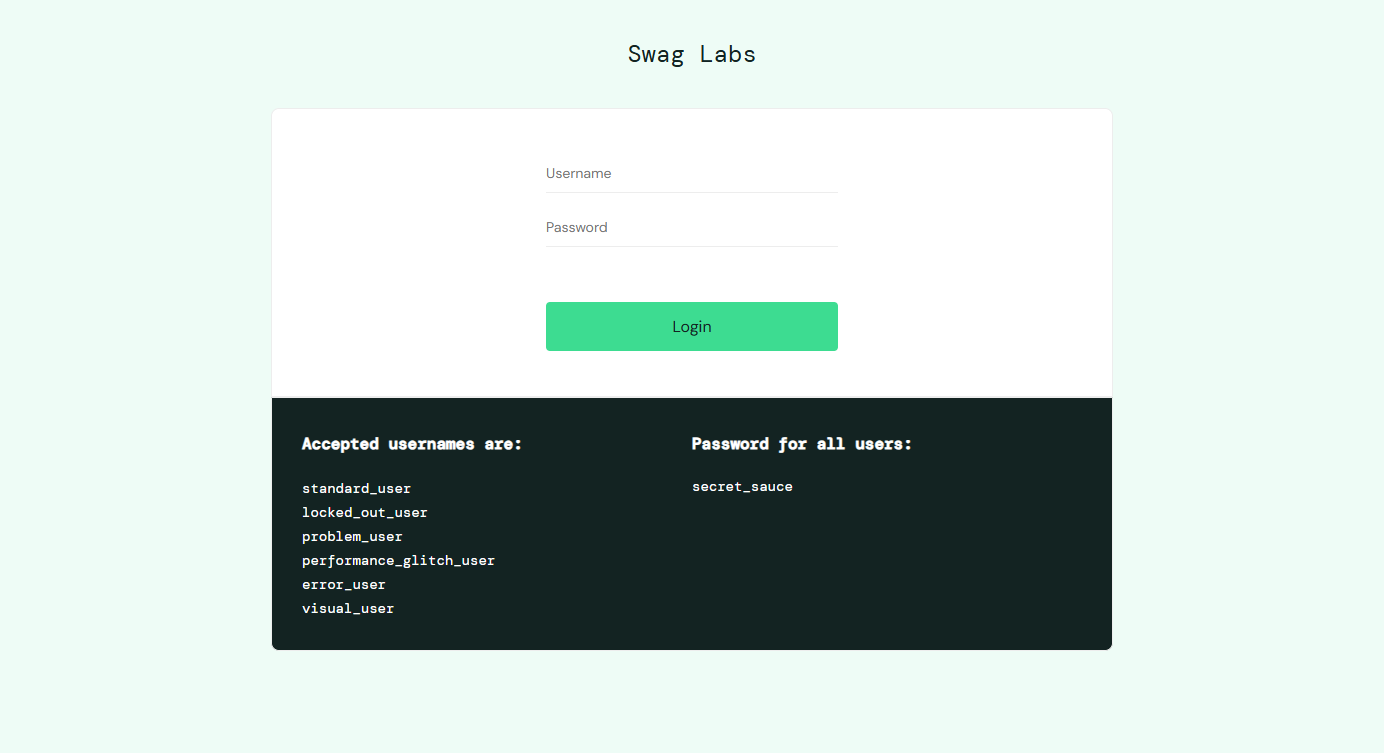
This example shows the complete structure of an OKW web test — from the YAML to a runnable test case. The system under test is the public demo shop saucedemo.com.
German business names
The widget and keyword names in the examples (Benutzer, Passwort,
Anmelden Mit) are German, because they come unchanged from the
runnable okw-examples
repository. Use the business language of your own domain — that is
exactly the point of business names.
Step 1: Create the app YAML
The app YAML defines the browser and collects all pages:
# locators/MyAppChrome.yaml
MyAppChrome:
  __self__:
    class: okw_web_selenium.adapters.selenium_web.SeleniumWebAdapter
    browser: chrome
  Chrome: !include Chrome.yaml
  _pages: !include-merge Allpages.yaml
__self__ configures the adapter. !include-merge brings all page YAMLs
into the app as direct children — not nested.
Step 2: Define the page YAML
Each page gets its own YAML file with business names:
# locators/SauceDemoLogin.yaml
__self__:
  class: okw_web_selenium.widgets.webse_label.WebSe_Label
  locator: { css: '[data-test="login-container"]' }

Benutzer:
  class: okw_web_selenium.widgets.webse_textfield.WebSe_TextField
  locator: { css: '[data-test="username"]' }

Passwort:
  class: okw_web_selenium.widgets.webse_textfield.WebSe_TextField
  locator: { css: '[data-test="password"]' }

Anmelden:
  class: okw_web_selenium.widgets.webse_button.WebSe_Button
  locator: { css: '[data-test="login-button"]' }

Fehlermeldung:
  class: okw_web_selenium.widgets.webse_label.WebSe_Label
  locator: { css: '[data-test="error"]' }
The YAML file serves two purposes:
- Business names. The test says
Benutzer(user) — a business term, not a technical ID (txtUser,btnLogin). The YAML maps it to the concrete locator. - Widget behavior.
classdefines how a keyword is executed on the GUI object. ATextFieldknows how toSetValue(clear + type), aButtonknows how toClickOn.
When a data-test attribute changes, you fix it here — once — and
all test cases keep working.
Step 3: Collect pages in Allpages
# locators/Allpages.yaml
SauceDemoLogin: !include SauceDemoLogin.yaml
SauceDemoProducts: !include SauceDemoProducts.yaml
New pages are added here once — all app YAMLs (Chrome, Firefox, ...) get them automatically.
Step 4: Write the test file
*** Settings ***
Library        okw_web_selenium.library.OkwWebSeleniumLibrary
Test Setup     Login Seite Oeffnen
Test Teardown  StopApp    MyAppChrome

*** Variables ***
${URL}    https://www.saucedemo.com

*** Keywords ***
Login Seite Oeffnen
    OnFailNOISE    StartApp       MyAppChrome

    OnFailNOISE    SelectWindow   Chrome
    OnFailNOISE    SetValue       URL    ${URL}

Anmelden Mit
    [Arguments]    ${benutzer}    ${passwort}

    OnFailNOISE    SelectWindow   SauceDemoLogin
    SetValue       Benutzer    ${benutzer}
    SetValue       Passwort    ${passwort}
    ClickOn        Anmelden

Login Erfolgreich

    OnFailNOISE    SelectWindow       SauceDemoProducts
    VerifyValue        Titel    Products

Login Fehlgeschlagen Mit Meldung
    [Arguments]    ${meldung}

    OnFailNOISE    SelectWindow       SauceDemoLogin
    VerifyValue        Fehlermeldung    ${meldung}

*** Test Cases ***
Login Standard User
    Anmelden Mit    standard_user    secret_sauce
    Login Erfolgreich

Login Gesperrter Benutzer
    Anmelden Mit    locked_out_user    secret_sauce
    Login Fehlgeschlagen Mit Meldung    Epic sadface: Sorry, this user has been locked out.

Login Ohne Passwort
    Anmelden Mit    standard_user    ${EMPTY}
    Login Fehlgeschlagen Mit Meldung    Epic sadface: Password is required
No selectors, no driver calls. SetValue, ClickOn and VerifyValue
are low-level keywords — they work for every GUI technology.
Anmelden Mit (log in with) is a high-level keyword that the test
project composes from them.
Step 5: Run
StartApp MyAppChrome opens Chrome automatically. StopApp closes it.
11 Test Cases, Zero Redundancy
The complete suite
SauceDemo_Login.robot
covers the login completely:
| Test cases | What they verify |
|---|---|
| 5 valid logins | standard, problem, performance_glitch, error, visual user |
| 1 locked user | Error message |
| 2 wrong credentials | Unknown user, wrong password |
| 3 empty fields | No user, no password, both empty |
Each test case has two lines. The YAML never changes, the keywords never change — only the test data varies.
OnFailNOISE
Setup steps such as StartApp, SelectWindow and entering the URL are
NOISE — they are not the actual test. If one of them fails, the test
case should be marked as NOISE, not as a real failure.
OnFailNOISE does exactly that: if the keyword fails, the test is
tagged NOISE.
Login Seite Oeffnen
    OnFailNOISE    StartApp       MyAppChrome

    OnFailNOISE    SelectWindow   Chrome
    OnFailNOISE    SetValue       URL    ${URL}
The actual test steps (SetValue Benutzer, ClickOn Anmelden,
VerifyValue) are written without OnFailNOISE — their failures
are real test results.
Modular YAML Structure
For web tests, separate app, browser and pages:
locators/
  Chrome.yaml               # Browser window (URL bar, ...)
  Firefox.yaml              # Browser window (URL bar, ...)
  SauceDemoLogin.yaml       # Page: login
  SauceDemoProducts.yaml    # Page: product overview
  Allpages.yaml             # Collects all pages via !include
  MyAppChrome.yaml          # App = adapter + Chrome + all pages
  MyAppFirefox.yaml         # App = adapter + Firefox + all pages
Benefits:
- New pages are added once in
Allpages.yaml— all browser variants get them automatically. - Switch browsers:
StartApp MyAppFirefoxinstead ofMyAppChrome. The tests stay identical. - Each page YAML is self-contained and easy to read.
More in This Chapter
| Page | Topic | Demo site |
|---|---|---|
| Repeating Structures | Product cards with SetContext |
saucedemo.com |
| Shadow DOM and iFrames | Isolation boundaries without test code changes | practice.expandtesting.com |
| Drag & Drop | HTML5 drag & drop that Selenium cannot trigger | practice.expandtesting.com |
| Tables | Cells by header names instead of positions | practice.expandtesting.com |
| Hover | Elements that only appear on mouse-over | practice.expandtesting.com |
| Reference | Widget classes, locator strategies, match modes, web keywords | – |