Repeating Structures
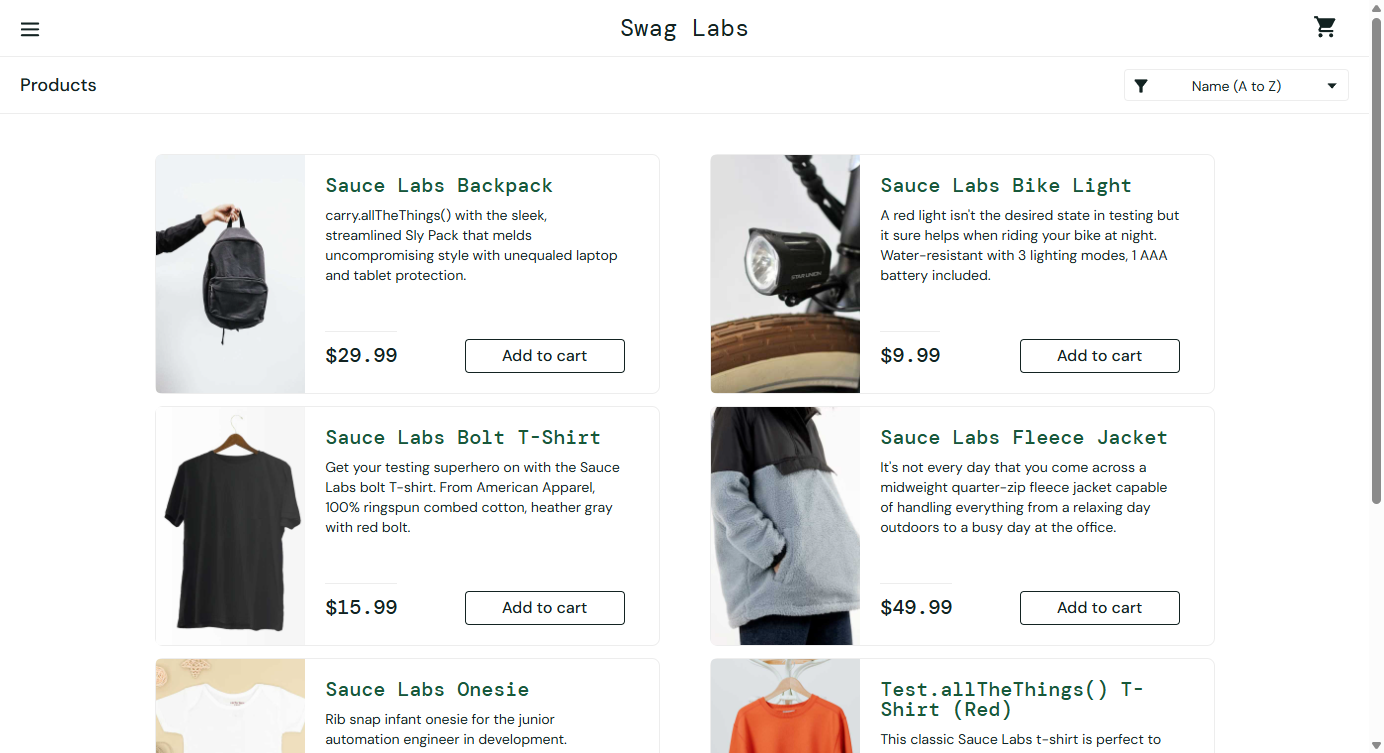
Every online shop has product cards, every dashboard has data rows, every inbox has message items. They all share the same problem: N identical structures, each with different data.
The classic approach: a method with an index, a loop over all elements,
or a separate locator per instance. It gets messy fast. With
SetContext the test simply says: "I am talking about the
Sauce Labs Backpack card now."
The theory is in Basics → SetContext. This page shows the practice on saucedemo.com.
The Test
*** Keywords ***
Produktpreis Pruefen
    [Arguments]    ${produkt}    ${erwarteter_preis}
    SetContext         ProduktKarte    ${produkt}
    VerifyValue        Produktpreis    ${erwarteter_preis}

Produkt In Warenkorb Legen
    [Arguments]    ${produkt}
    SetContext         ProduktKarte    ${produkt}
    ClickOn            InDenWarenkorb

*** Test Cases ***
SetContext Produktpreise Pruefen
    SauceDemo Oeffnen Und Anmelden

    OnFailNOISE    SelectWindow   SauceDemoProducts
    OnFailNOISE    VerifyValue    Titel    Products
    Produktpreis Pruefen    Sauce Labs Backpack      $29.99
    Produktpreis Pruefen    Sauce Labs Bike Light    $9.99
    Produktpreis Pruefen    Sauce Labs Bolt T-Shirt  $15.99
    Produktpreis Pruefen    Sauce Labs Fleece Jacket  $49.99
    Produktpreis Pruefen    Sauce Labs Onesie        $7.99
    StopApp        MyAppChrome

SetContext Produkt In Warenkorb
    SauceDemo Oeffnen Und Anmelden

    OnFailNOISE    SelectWindow   SauceDemoProducts
    Produkt In Warenkorb Legen    Sauce Labs Backpack
    Produkt In Warenkorb Legen    Sauce Labs Bike Light
    StopApp        MyAppChrome
The same keyword (VerifyValue Produktpreis — product price), a
different product each time. No loops, no indices, no separate definition
per card. Actions work the same way: the same button name
InDenWarenkorb (add to cart) acts on whichever card is currently set.
One YAML for All Cards
# locators/SauceDemoProducts.yaml (excerpt)
ProduktKarte:
  __context__:
    locator: { xpath: '//div[@data-test="inventory-item"][.//div[@data-test="inventory-item-name" and text()="{ProduktName}"]]' }
  Produktname:
    class: okw_web_selenium.widgets.webse_label.WebSe_Label
    locator: { xpath: './/div[@data-test="inventory-item-name"]' }
  Produktbeschreibung:
    class: okw_web_selenium.widgets.webse_label.WebSe_Label
    locator: { xpath: './/div[@data-test="inventory-item-desc"]' }
  Produktpreis:
    class: okw_web_selenium.widgets.webse_label.WebSe_Label
    locator: { xpath: './/div[@data-test="inventory-item-price"]' }
  InDenWarenkorb:
    class: okw_web_selenium.widgets.webse_button.WebSe_Button
    locator: { xpath: './/button' }
The __context__ block defines a container with the placeholder
{ProduktName}. All child widgets use relative locators (.//) — they
are evaluated inside the card that was found.
How It Works
- OKW finds
ProduktKarte.__context__.locator. {ProduktName}is replaced with "Sauce Labs Backpack".- The resolved XPath is stored as the active context.
- When
Produktpreisis accessed, OKW prepends the context XPath to the relative child locator. - Result: one XPath that finds exactly the price inside the Backpack card.
The next SetContext switches to the next card. SelectWindow clears
the context.
XPath only
SetContext requires XPath — both for the __context__ locator and
for the child locators. CSS selectors cannot match text content and
do not support relative path composition.
Why Not Just Use XPath With the Product Name?
You could write:
But then:
- every test contains the full XPath (NOISE in the test case),
- widget information is lost — no synchronisation, no screenshots, no retry,
- every test file must be changed when the DOM changes,
- the locator pattern cannot be reused.
With SetContext, the pattern is defined once in YAML. The test says
what it means — not how to find it.